Create a listing
Add the material, condition, title, weight, price per kg, photos and pickup location, then publish.
A listing tells buyers what you are selling, how much there is and what you want per kg. Good listings with clear photos get more offers and show higher in search.
Works in:Android appWeb app
Before you start
- Your account must be a seller or buyer and seller account. A buyer account sees "Selling is for seller accounts": change your role in your profile.
- Weigh the scrap if you can.
- Take a few clear photos from different sides.
Create the listing
- Open Sell scrap (web) or tap Sell in the app's bottom bar.
- Add photos and let us check them, or skip this step. See Photo scan and AI estimate.
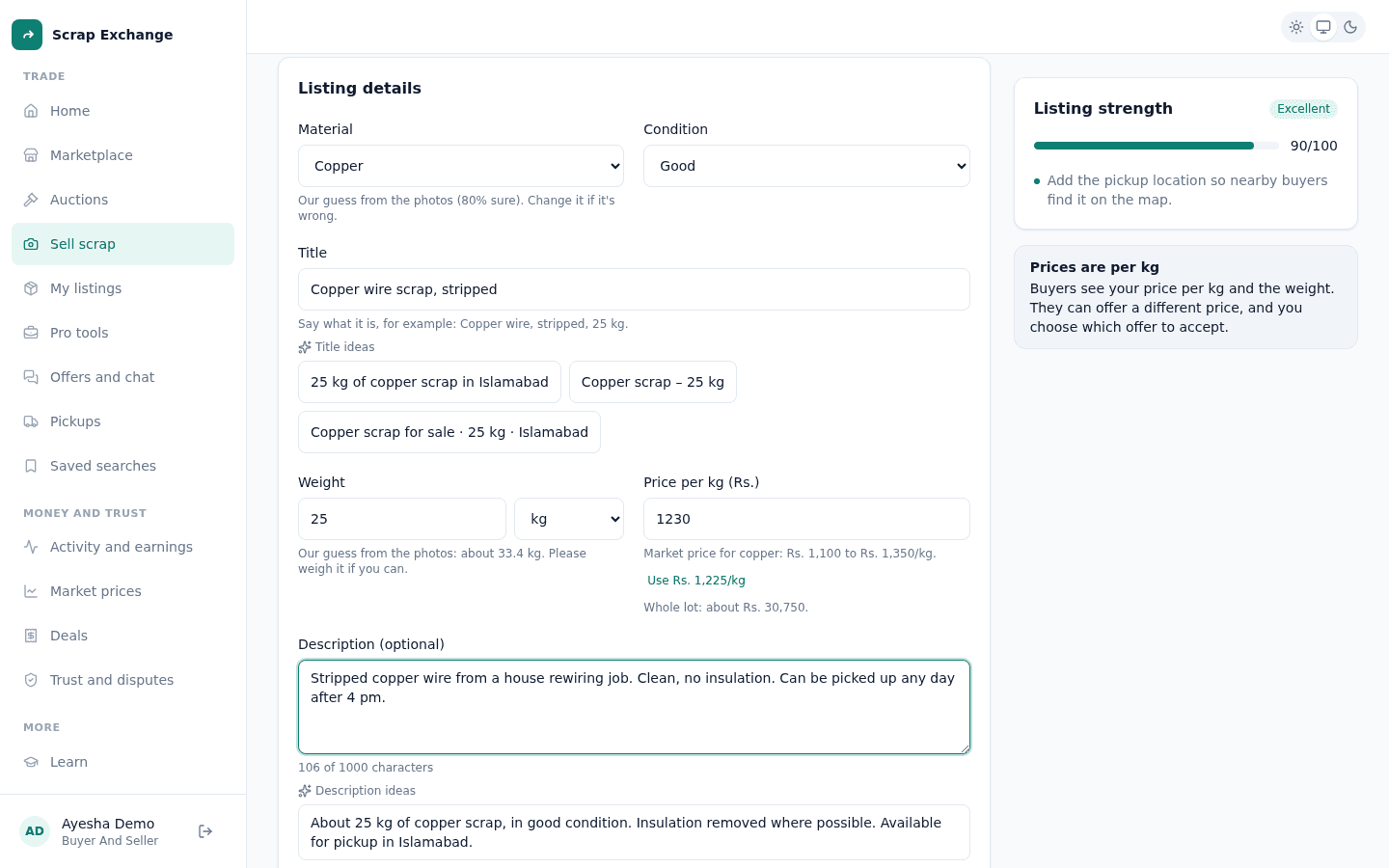
- Fill in the listing details:
- Material: copper, aluminium, iron and steel, plastic, paper, cardboard, glass, rubber, e-waste, organic or mixed.
- Condition: Excellent, Good, Average or Poor.
- Title: say what it is, for example "Copper wire, stripped, 25 kg". At least 5 characters.
- Weight: in kg or tonnes. Tonnes are saved as kg.
- Price per kg (Rs.): under the box you see the market price range for that material and a button to use the middle of it. You also see what the whole lot comes to.
- Description (optional): up to 1000 characters. Tap a description idea to start from one.
- Pickup location (optional): type your city or use your current location, so nearby buyers find it.
- Check the Listing strength card. It scores your listing out of 100 and tells you what to improve, like adding photos or a description.
- Under When should it go live?, choose Right now, or Later to schedule it. See Drafts and scheduled listings.
- Select Publish listing (or Schedule listing).
Your listing is live. Buyers near you can see it in the marketplace and start sending offers.
About prices
- All prices are per kg. Buyers see your price per kg and the weight. The whole lot is the price per kg times the weight.
- Buyers can offer a different price, and you choose which offer to accept. See Offers and counter offers.
- If a price looks far too high, the form asks you to check it for a typo.
Listing strength
Stronger listings show higher in search. The score looks at things buyers care about: photos, a clear title, a description, a sensible price compared with the market, and a location. When a listing has everything, you see "This listing has everything buyers look for".
After you publish
- Find it in My listings, with the offers on it.
- You get a notification when a buyer makes an offer.
- To change it later, see Edit, close and reactivate listings.