Use the web app
Use Scrap Exchange in any modern browser on a computer or phone, with the same account as the app.
The web app has the phone app's features in your browser. It uses the same account, so your listings, offers, chats and pickups are the same in both.
Open the web app
Go to scrapex.ubaidbinwaris.com (opens in a new tab) in a modern browser such as Chrome, Edge, Firefox or Safari, on a computer, tablet or phone. Then sign in or create an account.
Find your way around
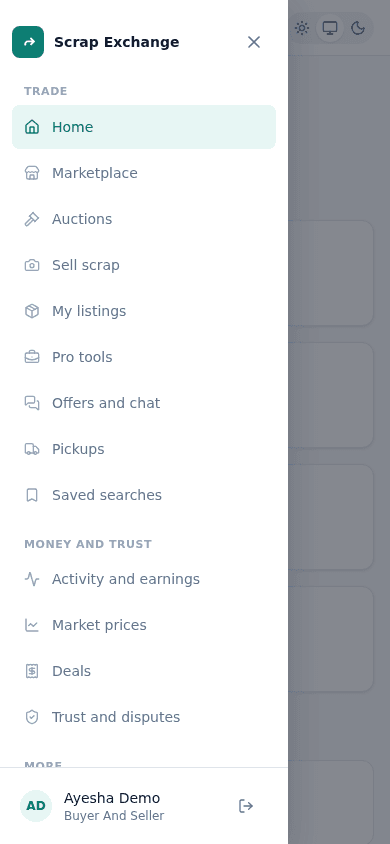
The menu on the left (or behind the menu button on a small screen) has three groups:
- Trade: Home, Marketplace, Auctions, Sell scrap, My listings, Pro tools, Offers and chat, Pickups and Saved searches. Sell scrap, My listings and Pro tools only show for seller accounts.
- Money and trust: Activity and earnings, Market prices, Deals, and Trust and disputes.
- More: Learn, Updates, Invite friends, Send feedback and Settings.
Your name and a Sign out button are at the bottom of the menu. Signing out there only signs out this browser.
What is different from the app
Most things work the same way in both. A few things are only in the Android app:
- The guided camera scan with live hints (on the web, you add photos and we check them).
- Starting an auction (you can bid in auctions on the web).
- The local map of dealers and writing a review from a dealer's map card.
- Reading the weight from a photo of the scale at a pickup.
- Push notifications and the in-app updater.
- Signing in with Google.
Staying signed in
- You can be signed in on any number of browsers and your phone at the same time. See Phone and browsers at the same time.
- The web app signs you out after 2 hours without activity, with a 1-minute warning first. See Automatic sign-out.
- A new browser asks for a 6-digit sign-in code the first time. See Sign in.