On pickup day: tracking, weighing and payment
Start the trip, share your live location, weigh the scrap, send the final terms and confirm payment.
On pickup day the buyer travels to the seller, weighs the scrap, and sends the final weight and price with photos. The seller checks them, gets paid, and confirms. That completes the deal.
Works in:Android appWeb app
The steps at a glance
| Status | Who acts | What happens |
|---|---|---|
| Scheduled | Buyer | Taps Start trip when leaving. |
| On the way | Buyer | Shares their live location. Taps I have arrived on arrival. |
| Buyer arrived | Buyer | Weighs the scrap and sends the final weight, price and photos. |
| Waiting for seller | Seller | Checks the terms, gets paid, and taps Confirm and complete (or asks for changes). |
| Completed | Both | The deal is saved with a receipt. Rate each other. |
For buyers: travel to the seller
- When you leave, open the pickup and tap Start trip. The seller sees you are on the way.
- Allow location sharing when asked. While you travel, your location is shared so the seller knows when to expect you. You can Stop sharing at any time.
- When you get there, tap I have arrived. If you forgot to start the trip, you can still tap I'm already here (in the app).
For sellers: follow the buyer
While the buyer is on the way, the pickup page shows how far away they are and Arrives in with an estimated time, plus when their location was last updated.
For buyers: weigh and send the final terms
- Weigh the scrap with the seller watching. Ask them to watch you zero the scale first.
- Under Weigh and confirm, add 1 to 5 photos of the scrap and the scale. A clear photo of the scale display helps the seller agree quickly.
- Enter what the scale shows (kg). In the Android app, take a photo of the scale and the app reads the weight for you. If the weight you type doesn't match the scale photo, you are warned before you send it.
- Enter the Final weight (kg) and the Price per kg (Rs.). The agreed values are shown for comparison.
- If the price per kg is different from the agreed price, explain why under Why did the price change? (for example, the material was mixed). Otherwise you can add a note for the seller.
- Send it to the seller for confirmation.
For sellers: check, get paid and confirm
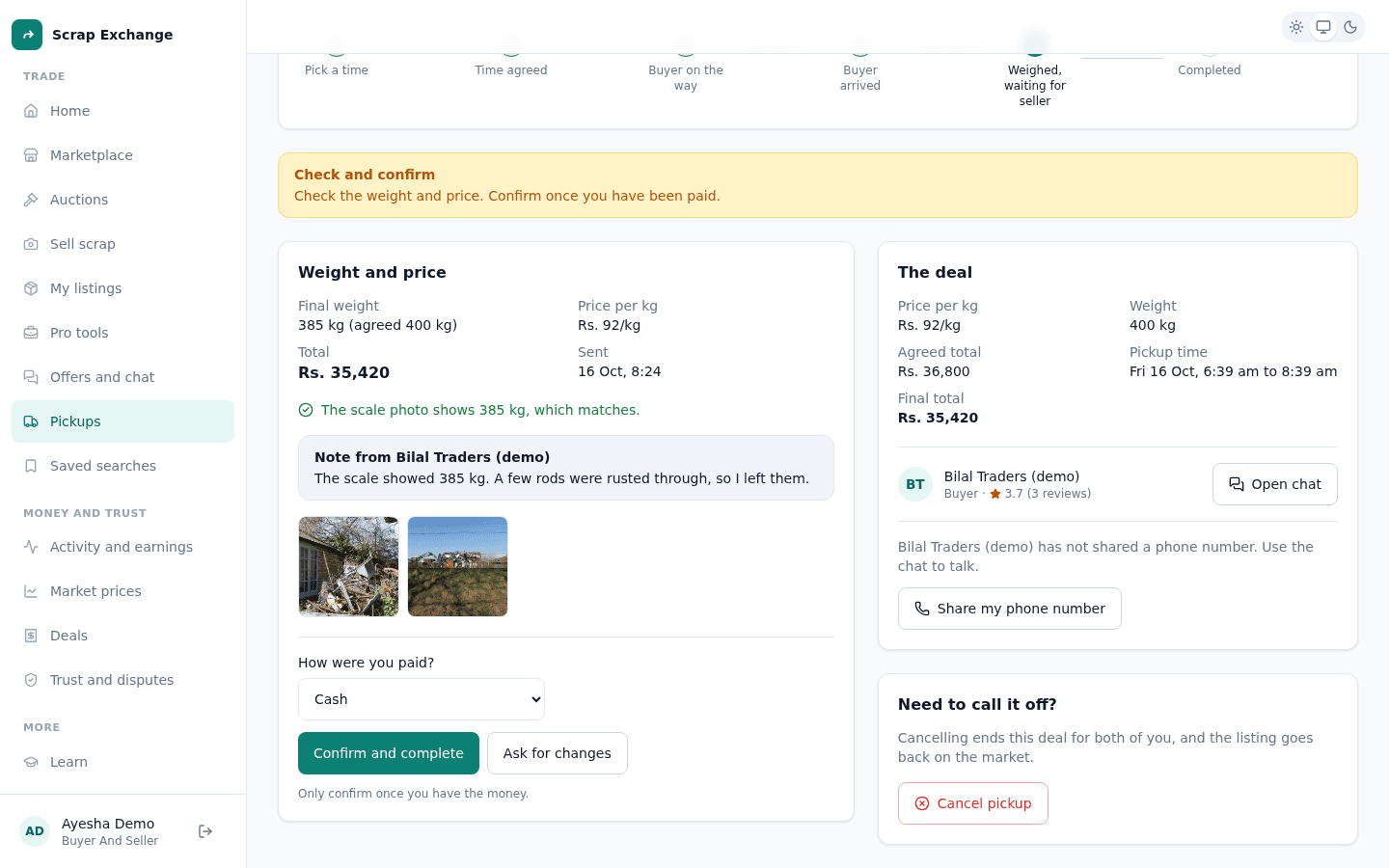
- Under Weight and price, check the final weight, the price per kg and the photos. The page tells you if the scale photo matches the weight that was entered.
- Read the buyer's note, if any, especially if the price changed.
- Get paid. Under How were you paid?, choose Cash, JazzCash, Easypaisa or Bank transfer.
- Tap Confirm and complete.
You see "Pickup completed. Thank you!" The deal is saved in your activity and in Deals.
Not happy with the terms?
Tap Ask for changes (in the app: Request changes) and say what should change, in at least 5 characters. The pickup goes back to the buyer, who can weigh again or fix the price and send it again.
After the pickup
- Both of you can rate each other. See Ratings and reviews.
- The deal record has the receipt and photos. See Deals and receipts.
- Deal with them again? Set this pickup to repeat. See Repeat pickups.
- Something wrong? You have 7 days to report a problem. See Disputes.